
I’ve been using Windows 8.1 on the Acer Iconia W3 for a couple of days now, and overall the experience has been decent. The W3 isn’t the best tablet I’ve ever used, but it’s not horrid.
One thing I’ve been a bit disappointed with, though, is the design and behavior of some apps when used in portrait mode. Smaller tablets such as the W3 lend are designed to be operated primarily in portrait mode.
I haven’t looked at every app to see how it behaves in portrait mode, but a few examples of problematic behavior and design jumped out at me. I’ll outline them here with some thoughts on how they can be addressed.
Xbox Music
 When using the Xbox music in portrait mode on the W3, the left column compresses to the point where you can’t access the menu to get to other areas of the app.
When you start up the app, you’re started in your collection. As far as I can tell, if you want to go to Radio or Explore, for instance, you have to rotate the app to landscape mode to access them. This seems like a huge oversight to me.
In my opinion, the best way to fix this would be to make the left column expand when you tap it (similar to how OneNote MX works).
[pullquote]This seems like a huge oversight to me.[/pullquote]Also, the media transport controls that are on the bottom application bar are not visible when in portrait mode. Unless I’m missing something, this means that the only way to access the transport controls is to hit the volume up or volume down button to bring up the system transport controls. Additionally, I can’t find any way to access the “now playing” screen since the bottom application bar controls are not visible.
 Bing News
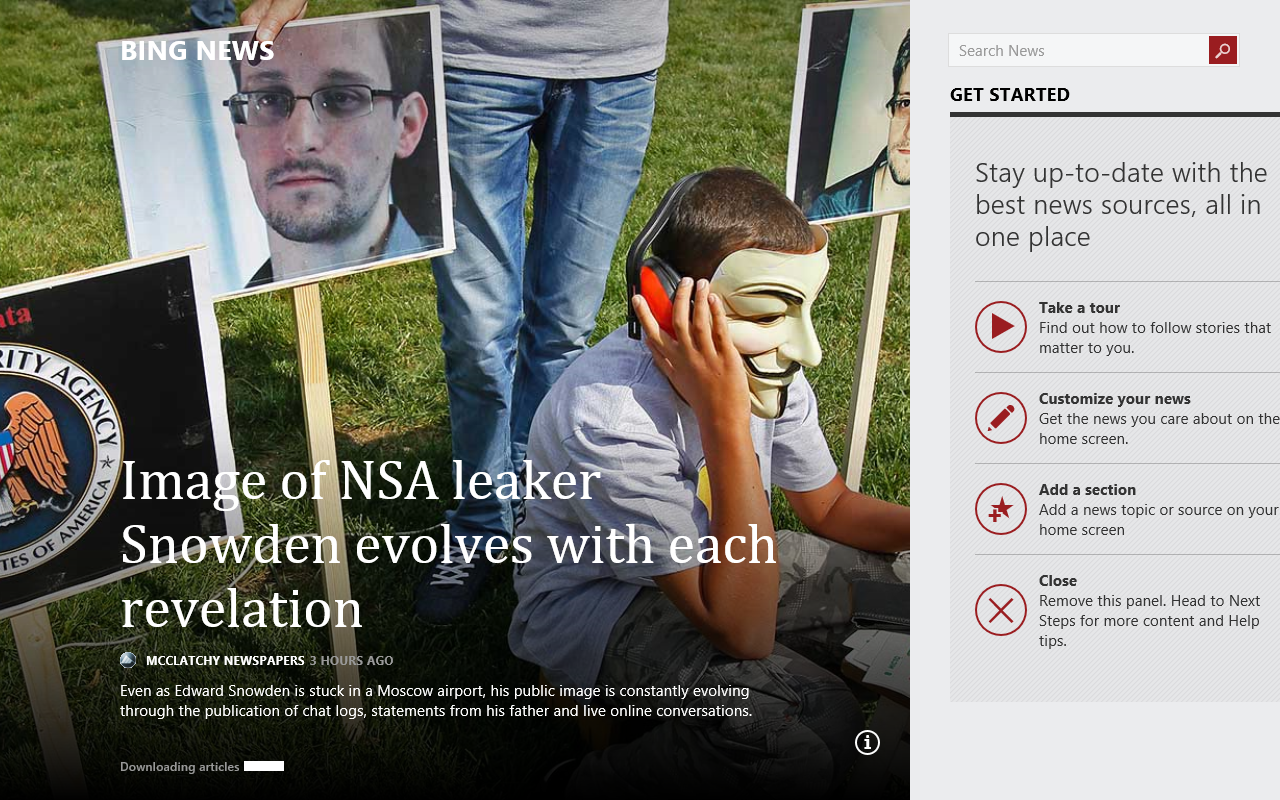
Another example isn’t quite so egregious, but I think it demonstrates the fact that developers need to think about how their apps are designed for portrait mode so they still make sense to end users.  The Bing News app (one of my favorites, by the way) could be slightly confusing for users when used in Portrait mode. As you can see in the picture of the Bing News app in landscape mode (above), there is a main story image and then an area to the right that lets the user know there is more content to the right.
In portrait mode (right), however, the Bing News app only shows the main story. There are no visual clues for the user so they’ll understand how to get to the additional content.
My recommendation would be to make the main story image smaller and include even just a small amount of the content that is to the right of the main story. This will give the user a hint that there’s more in that direction.
Think About Your Portrait Mode Users
Hopefully, Microsoft will address these oversights in the portrait mode scenarios of their built-in apps before Windows 8.1 RTMs. With the focus that Microsoft is putting on smaller tablets for Windows 8.1, developers need to really think about their portrait mode users when designing their apps to make sure that all the features are exposed and easy to use.
 Twist: On Tech (and more)
Leave a comment